
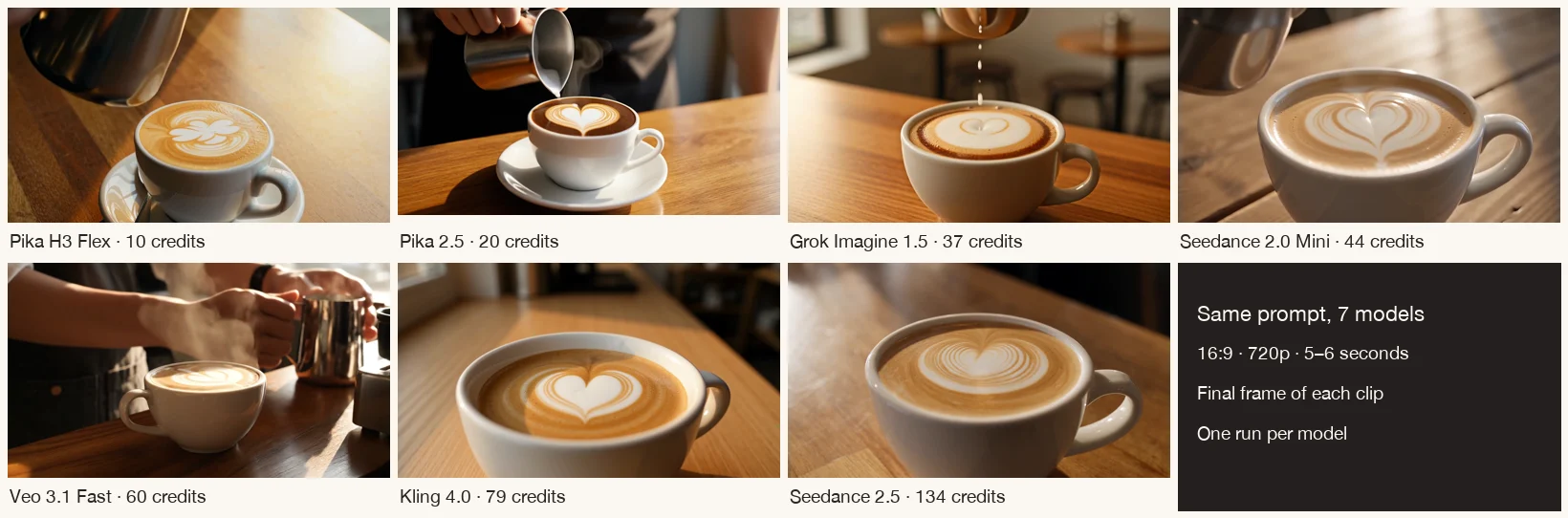
For this prompt, Kling 4.0 and Seedance 2.5 followed the brief most closely, and Seedance 2.0 Mini came close for a third of Seedance 2.5’s price. Pika’s own models were the cheapest, but neither formed the heart during the pour.
Pika lets you pick from many video models in one account. To see what the price difference buys, we gave seven of them the same text prompt and the same settings, then compared the clips and the credits charged.
How we ran the test
Every model got this prompt, typed exactly the same way:
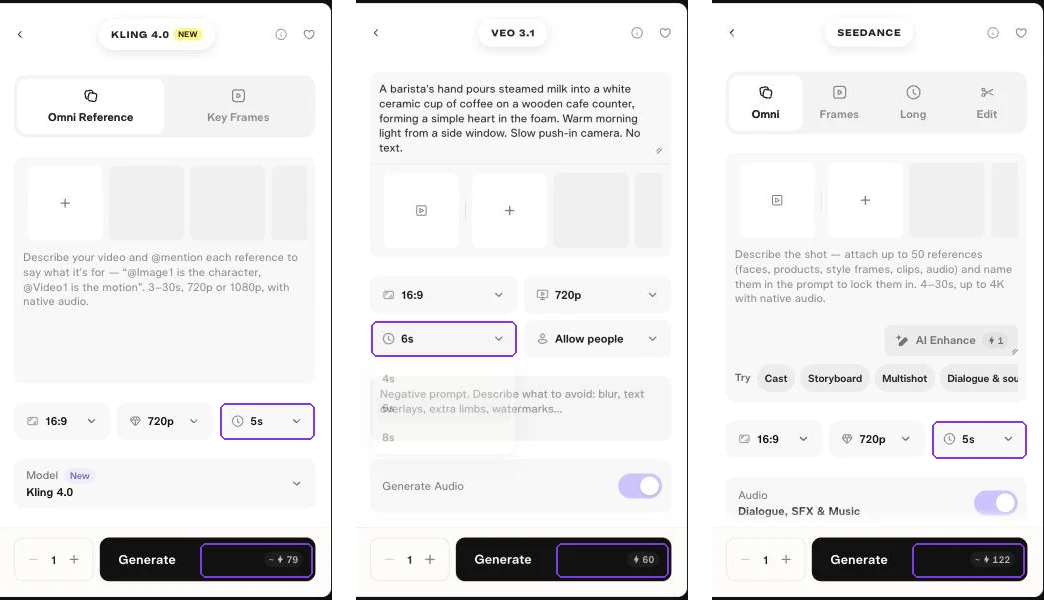
A barista’s hand pours steamed milk into a white ceramic cup of coffee on a wooden cafe counter, forming a simple heart in the foam. Warm morning light from a side window. Slow push-in camera. No text.
| Setting | Value |
|---|---|
| Input | Text only, no reference image |
| Aspect ratio | 16:9 |
| Resolution | 720p (H3 Flex offers 768p as its closest option) |
| Length | 5 seconds (Veo 3.1 offers 4, 6 or 8; we used 6) |
| Outputs | 1 per model |
| Audio | Each app’s default |
| AI Enhance | Not used, so no model rewrote the prompt |
We judged each clip on four things the prompt asked for: a hand pouring, a heart forming in the foam, a slow push-in, and no text on screen.
Results at a glance
| Model | Credits charged | Heart forms in the pour | Push-in | Audio | Our take |
|---|---|---|---|---|---|
| Pika H3 Flex (draft) | 10 | No, leaf shape | Yes | Yes | Cheapest; fine for quick drafts |
| Pika 2.5 | 20 | Heart already there at the start | Slight | None | Clean image, but skipped the action |
| Grok Imagine 1.5 | 37 | Small heart inside a ring | Slight | Almost silent | Pour looks right; pattern is weak |
| Seedance 2.0 Mini | 44 | Yes | Strong | Yes | Best value in this test |
| Veo 3.1 Fast | 60 | No, leaf or tulip | Little | Yes | Best light and steam, weakest on the brief |
| Kling 4.0 | 79 | Yes, clear heart | Strong | Yes | Closest match to the prompt |
| Seedance 2.5 | 134 | Yes, detailed heart | Strong | Yes | Strong match, highest cost |
No clip added text. All seven are 16:9; most export at 1280 × 720.
Watch each clip
Pika H3 Flex · 10 credits
H3 Flex produced a believable pour and a camera move for just 10 credits. The pattern was wrong, so treat it as a fast way to test framing and light before paying for a stronger model. See our H3 Flex guide for its other modes.
Pika 2.5 · 20 credits
The cup, saucer and light look clean, and there is a heart. But it is there from the first frame, so the pour does not create it. Pika 2.5 has no audio. It is a good choice for simple product motion from a photo; see the Pika 2.5 guide.
Grok Imagine 1.5 · 37 credits
Grok’s default length is 6 seconds (45 credits). Setting it to 5 seconds lowered the cost to 37. The audio track was present but almost silent.
Seedance 2.0 Mini · 44 credits
This was the surprise. It did all four things the prompt asked for at about a third of Seedance 2.5’s price. The form showed an estimate of 40–44 credits and charged 44.
Veo 3.1 Fast · 60 credits
Veo’s app uses Veo 3.1 Fast by default and offers 4, 6 or 8 seconds. Its lighting, steam and café detail looked the most polished. It ignored two parts of the brief: the heart and the camera move. At the end the barista pulls the pitcher away and reaches across the frame.
Kling 4.0 · 79 credits
Kling 4.0 matched the prompt most closely. The heart builds from the pour and fills the final close-up. For a wider comparison with Kling’s own site, see Pika vs Kling.
Seedance 2.5 · 134 credits
Seedance 2.5 also nailed the brief, with the most detailed foam pattern. It was the most expensive run: the form estimated 122–134 credits and charged 134.
Which model should you use?
| If you want… | Start with | Why |
|---|---|---|
| The lowest cost per test | Pika H3 Flex | 10 credits a draft; good for checking framing |
| A close match to a detailed prompt | Kling 4.0 | Followed every part of our brief |
| Good results on a budget | Seedance 2.0 Mini | Did what Kling did for 44 credits |
| The richest look, prompt matters less | Veo 3.1 Fast | Best light and atmosphere |
| A silent product clip from a photo | Pika 2.5 | Cheap and clean, no audio to remove |
A practical approach: draft with H3 Flex or Seedance 2.0 Mini, then rerun only your best idea on Kling 4.0 or Seedance 2.5.
If you need a still rather than a clip, our image model comparison runs a similar café prompt through four image models.
What to check before you generate
- Read the estimate on the button. Two forms showed a range, and both charged the top of it.
- Check the length. Grok defaults to 6 seconds and Veo to 8. Changing them lowered the cost.
- Check audio. Several models add sound by default. Turn it off if you plan to add your own.
- Leave AI Enhance off if you want your exact wording. It rewrites the prompt and costs 1 credit.
- Ignore the Upgrade button on queued jobs unless you want to pay for faster processing.
Our pricing guide lists Pika’s published cost for each model.
Limits of this test
- One prompt and one run per model. Another prompt, or a second run, can give different results.
- We judged prompt match, not every possible quality measure.
- Veo ran for 6 seconds and H3 Flex at 768p, because those were the closest options.
- Credits are what our account was charged. Your quote may differ with other settings.
Common questions
Which video model in Pika follows prompts best?
In our test, Kling 4.0 and Seedance 2.5 matched every part of the prompt. Seedance 2.0 Mini came close for much less. This is one prompt, so try your own idea on a cheap model first.
What is the cheapest video model in Pika?
Pika H3 Flex was the cheapest at 10 credits for a 5-second draft. Pika 2.5 cost 20 credits at 720p.
Is Veo 3.1 worth it on Pika?
For atmosphere and lighting, Veo 3.1 Fast looked the most polished. For following a specific action, it was the weakest in our test.
Do all Pika video models include audio?
No. Pika 2.5 produced no audio track. The others added sound by default, though Grok’s track was almost silent.
Why did my generation cost more than the price on the pricing page?
Length, resolution, audio and output count all change the cost. Some forms show a range and may charge the upper figure. Always read the button before you generate.