
I start with the result I need: a still product with a moving camera, a small portrait gesture, or a transition with a specific ending. Then I choose one action and one camera direction.
We used the two mug prompts below with Pika 2.5, selected 1080p, five seconds and one output each. Both cost 45 credits. They are recorded examples; the other examples are labelled starter prompts so you can tell the difference.
Choose a goal: product · portrait · landscape or interior · ordered frames · camera motion.
Match the prompt to your input
| Starting point | What I put in the prompt | What I set in the form |
|---|---|---|
| One image | Movement, camera direction and details to retain | Model, resolution, duration and output count |
| Words only | Subject, setting, composition, lighting, then movement | Model, resolution, duration and output count |
| Ordered images | How to move between the supplied views | Frame order and transition settings |
A source photo already supplies the scene. I avoid asking for a new outfit, background and camera move in the same first attempt. For words only, I describe the scene before the action. Our matched comparison shows why the choice matters.
Camera directions below are prompt instructions. They are not a claim that Pika 2.5 has a separate control for every move. Use the available Prompt field in the dedicated app.
Product prompts
Recorded test: animate the mug photo
Use: a small product movement when the appearance and starting frame already matter. Input: our ivory mug photo. Camera: slow push-in.
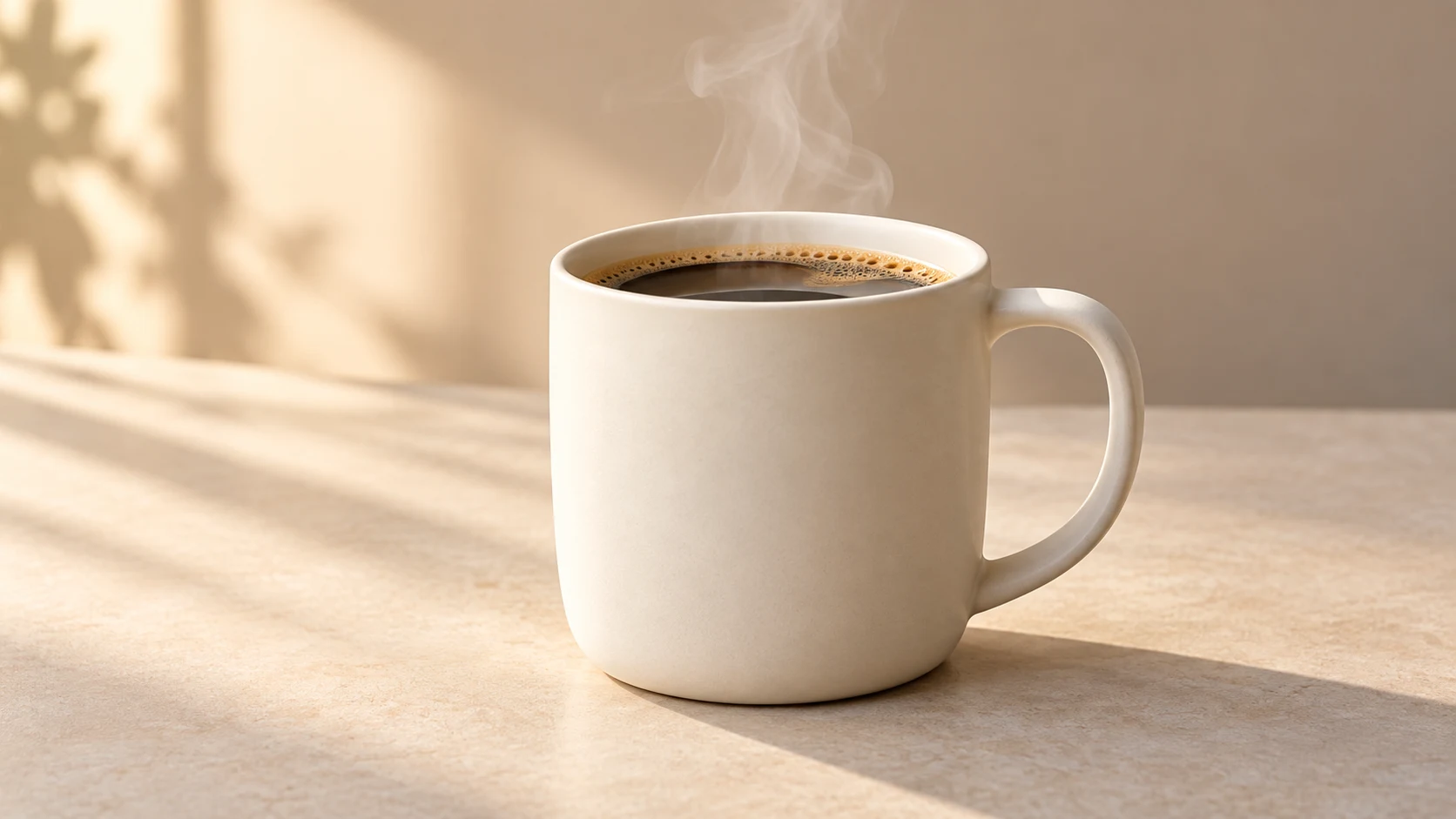
Steam rises gently from the coffee. The camera slowly moves closer to the mug. Keep the mug shape, handle, tabletop and warm lighting consistent. No new objects.
The opening and ending checks supported the mug’s appearance better than the text-only attempt. Watch the whole clip before approving shape, framing and any lettering. The video above is this prompt’s result.
Recorded test: create the mug scene from words
Use: a new scene when you can accept a generated product appearance. Input: text only. Camera: the same requested push-in.
One unbranded matte ivory ceramic coffee mug filled with hot coffee on a pale beige tabletop. The whole mug and its handle are visible in a three-quarter view, with space around the product. Soft morning light from the left and a plain warm beige background. Steam rises gently from the coffee. The camera slowly moves closer to the mug. Keep the mug shape, handle, tabletop and warm lighting consistent. No new objects.
A phrase such as “No new objects” is a request. It did not prevent the extra pouring action in this attempt. We changed the input workflow rather than treating that phrase as a reliable switch.
Starter: a shoe with a sideways camera move
Input: one product photo, with the whole toe and heel visible. Goal: show the side profile.
The camera tracks slowly to the right while keeping the shoe centered. The shoe stays still. Keep its laces, sole, panels and colour consistent. Keep the whole toe and heel in frame. No new objects.
Check that the shoe stays still while the camera moves. If it turns, shorten the camera request or try a locked view. In our separate Product Shot tests, product motion needed a close check even with explicit instructions.
Starter: keep a bottle still
Input: a bottle photo. Goal: subtle movement around the product.
A soft leaf shadow moves slowly across the background. The camera remains locked. The bottle stays upright and still. Keep the cap, glass outline and product colour unchanged. No hands or pouring.
Check the cap and bottle outline at the start, middle and end. This example simplifies our earlier bottle brief; it is a starter, not a rerun with a recorded result.
Portrait prompts
Use a portrait you have permission to animate. Keep the face clear and leave space around the head. These are starter prompts, not recorded portrait tests.
A small expression, with a locked camera
The person blinks once and forms a slight smile. The camera remains locked. Keep the face, hairstyle, clothing and background consistent. No head turn or hand gesture.
Check: eyes, teeth and face shape. Start with this when an expression matters more than a camera move.
A gentle camera approach
The person holds a relaxed pose. The camera slowly moves closer, stopping before the top of the head leaves the frame. Keep the face and clothing consistent. No speaking or new gestures.
Check: headroom and face identity. For spoken dialogue, use the Talking Head workflow with its speech and lipsync settings rather than assuming an ordinary video prompt adds speech.
Hair movement without changing the pose
A light breeze moves a few strands of hair. The person keeps the same pose. The camera remains locked. Preserve the face, outfit and background. No new objects.
Check: hair movement stays small and the person does not drift across the frame.
Landscape and interior prompts
These are starter prompts. Use one image when you want to retain an existing place; add the scene description for text-to-video.
Water moving in a still landscape
Small ripples move across the lake. The camera remains locked. Keep the shoreline, mountains and horizon still. No boats or people appear.
For text input, prepend: “A quiet mountain lake at sunrise, viewed from the shore, with soft morning light and a level horizon.”
Check: the horizon and mountains stay stable while the water changes.
A slow pan across a room
The camera pans slowly to the right across the room. Furniture stays still and keeps its shape. Keep the lighting consistent. No people or new furniture.
Use: a wider room photo with space beside the main furniture. Check: straight edges, windows and newly revealed areas. A single image cannot specify everything outside its frame.
A tilt toward a tall subject
The camera tilts slowly upward from the tree trunk toward the branches. Leaves move slightly in a light breeze. Keep the tree in place and preserve daylight. No added objects.
Use: an image with the trunk and branches already visible. Check: the trunk does not stretch or bend as the framing changes.
A tested two-frame transition
For a specific start and end, I supply both images through Pikaframes. Our mug pair used a closer first view and a wider second view, selected 720p, a five-second transition and one output. The completed charge was 20 credits.
The camera slowly pulls back from the first frame to the second frame. Gentle steam rises. Keep the ivory mug, handle, coffee, tabletop and warm lighting consistent. No pouring, no hands, no extra objects.
Use one image for an open-ended small movement. Use ordered frames when a particular final composition is part of the brief. Keep subject appearance, lighting and background compatible between your images.
Choose one camera motion
| Camera choice | Wording to try | What should change | What I inspect |
|---|---|---|---|
| Locked | “The camera remains locked.” | Subject movement only | Background drift |
| Push-in | “The camera slowly moves closer.” | Subject becomes larger | Cropped head, feet or product |
| Pullback | “The camera slowly moves away.” | More space around subject | Invented surroundings |
| Pan right | “The camera pans slowly to the right.” | View turns sideways | Bent edges or subject sliding |
| Track right | “The camera moves slowly to the right.” | Viewpoint shifts sideways | Product rotation and shape |
| Tilt up | “The camera tilts slowly upward.” | View turns upward | Stretched tall subjects |
| Small orbit | “The camera moves in a small arc around the subject.” | A little more of its side | Invented hidden details |
Pan and track describe different camera intentions, but a generated clip may not reproduce that distinction accurately. I start with a locked view or short push-in before asking for an orbit. Hidden product sides are a poor place to rely on a single reference photo.
Adapt a prompt and judge the result
- Select the input workflow and one goal above.
- Replace the subject and its important details. Remove instructions that do not fit your photo.
- Choose one action and one camera instruction.
- Set model, resolution, duration and output count in the form. Read the quote there.
- Watch the full result and write down the specific mismatch before changing the prompt.
Our mug tests show a useful starting point, not a universal prompt. I change one thing between attempts so the next result can tell us something. Use the prompt generator to assemble your version, then save the prompt with the source image and settings.