
In Pika, cancelling means downgrading to the Free plan. There is no separate “Cancel” button. You open your Subscription page, choose Adjust plan, and pick Downgrade to free.
Your paid plan keeps working until the end of the period you have paid for. After that it stops renewing and your account moves to Free.
Before you cancel
- Use your plan credits first. Monthly plan credits do not carry over, and they will not move to the Free plan.
- Download what you want to keep. Pika’s help pages do not say a downgrade removes Library items, but a local copy is the safe option.
- Check how you pay. If you subscribed in the iOS app, you cancel through the App Store instead (see below).
- Consider a smaller plan. If you only need fewer credits, downgrading to Starter may suit you better. See the pricing guide.
Cancel on the website
- Sign in at create.pika.art with the account that pays for the plan.
- Open the account menu at the bottom of the sidebar and choose Subscription.
- Select Adjust plan next to your current plan.
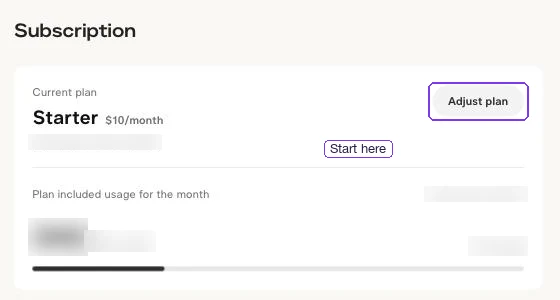
- In Manage Plan, stay on the Individual tab. The Free plan card is on the left.
- Select Downgrade to free, then confirm.
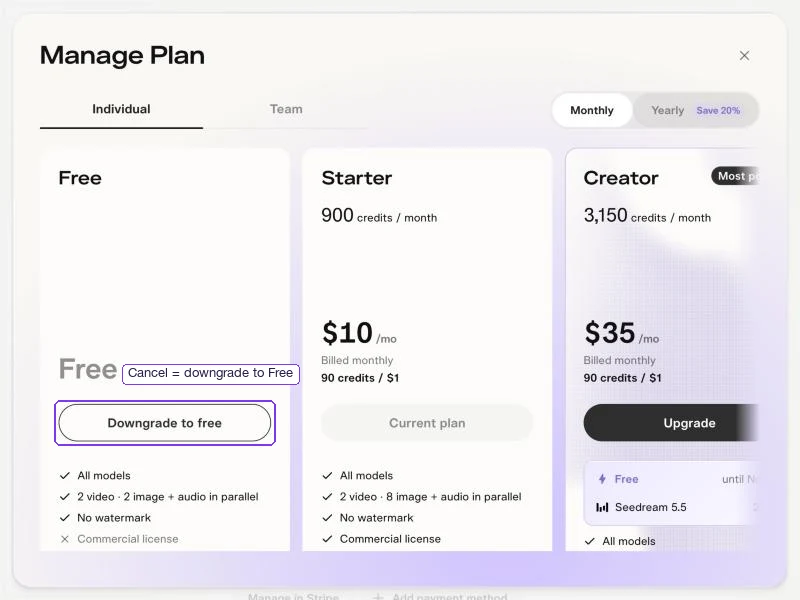
Pika’s Help & Support page describes the same route and says your plan stays active until the end of the current payment cycle.
If you change your mind before the period ends, Pika says a scheduled downgrade can be undone until then.
Cancel an App Store subscription
If you subscribed in the Pika iOS app, Pika’s support page says the Subscription page shows Billed through the App Store. Cancel it on your iPhone instead:
- Open Settings and tap your name.
- Tap Subscriptions.
- Choose Pika and tap Cancel Subscription.
Pika also links to the App Store from its Subscription page for these plans.
What happens after you cancel
| What | After you cancel |
|---|---|
| Paid features | Stay active until the end of the paid period |
| Next payment | Not charged |
| Monthly plan credits | Stop refreshing; unused ones do not carry over |
| Top-up credits | Pika says they carry over and expire 365 days after purchase |
| Commercial license | Free does not include one, so new work made on Free is not covered |
| Your Library | Pika’s help pages do not mention removing it; keep local copies of important work |
On Free you can still sign in and buy credit packs. Free has no monthly credits.
Refunds and wrong charges
Pika says subscription payments and credit packs are non-refundable. Cancelling stops the next renewal; it does not refund the rest of the current period.
Pika’s support team will look at problems such as credits taken for a generation you never received. Use the form on Pika’s Help & Support page and include:
- The account email and how you sign in (Google, Apple, Discord or email).
- The date of the charge or the failed generation.
- What you were making, and a screenshot with payment details covered.
Never send full card numbers or passwords. For invoices and payment methods, use Manage in Stripe on the Subscription page.
Delete your account instead
Cancelling does not delete your account. To delete it, Pika’s FAQ says to contact support from the account’s email address. Deletion is permanent, so download your work first.
Common questions
Does Pika have a cancel button?
Not under that name. Choose Adjust plan on the Subscription page, then Downgrade to free. That cancels your paid plan at the end of the current period.
Will I lose access straight away?
No. Your paid plan stays active until the end of the period you paid for, then your account moves to Free.
Can I get a refund if I cancel early?
Pika says payments are non-refundable, including the unused part of the current period. Contact support only for an incorrect charge.
What happens to my unused credits?
Monthly plan credits do not carry over. Top-up credits carry over and expire 365 days after purchase.
I cancelled but was still charged. What should I do?
First check that you cancelled the right account: Google and Apple sign-ins can create separate Pika accounts. If you pay through the App Store, cancel there. Then contact Pika support with the charge date and your sign-in method.