
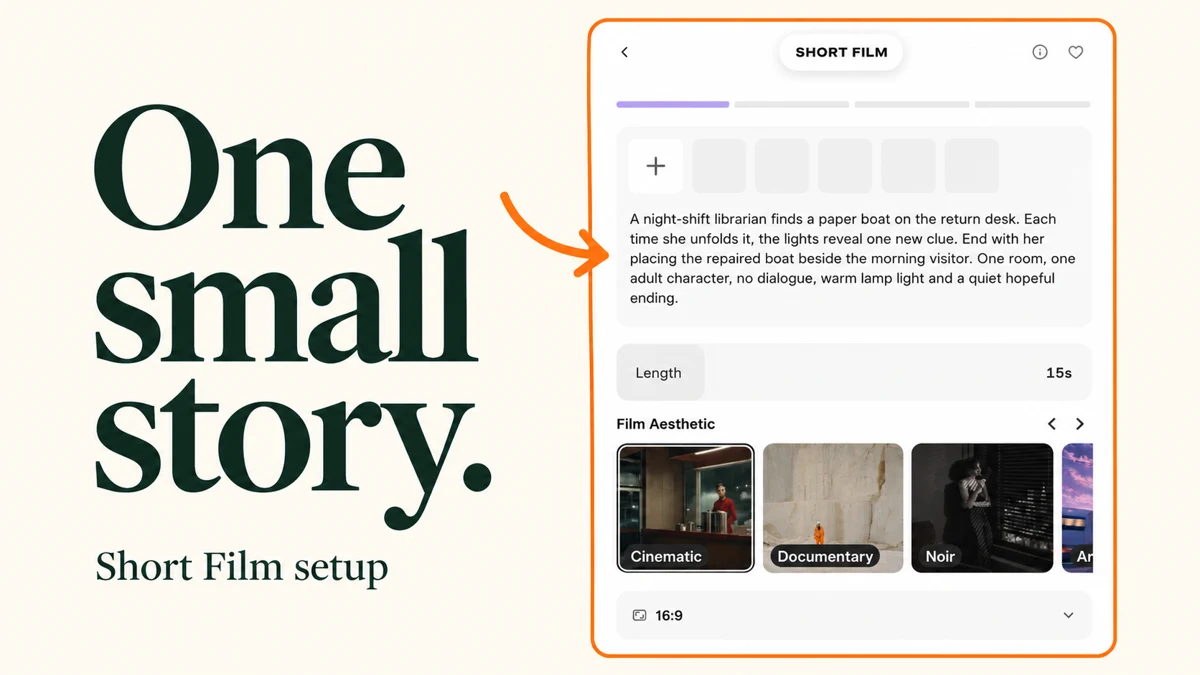
I explored Pika Short Film with a small story about a librarian and a paper boat. We start with one room, one main character and one change, so the idea is easy to turn into a short sequence.
This is a setup guide with real screenshots and copyable story ideas. I did not submit the idea or generate a script, cast, storyboard or film. Interface checked 10 October 2026.
Start with this simple setup
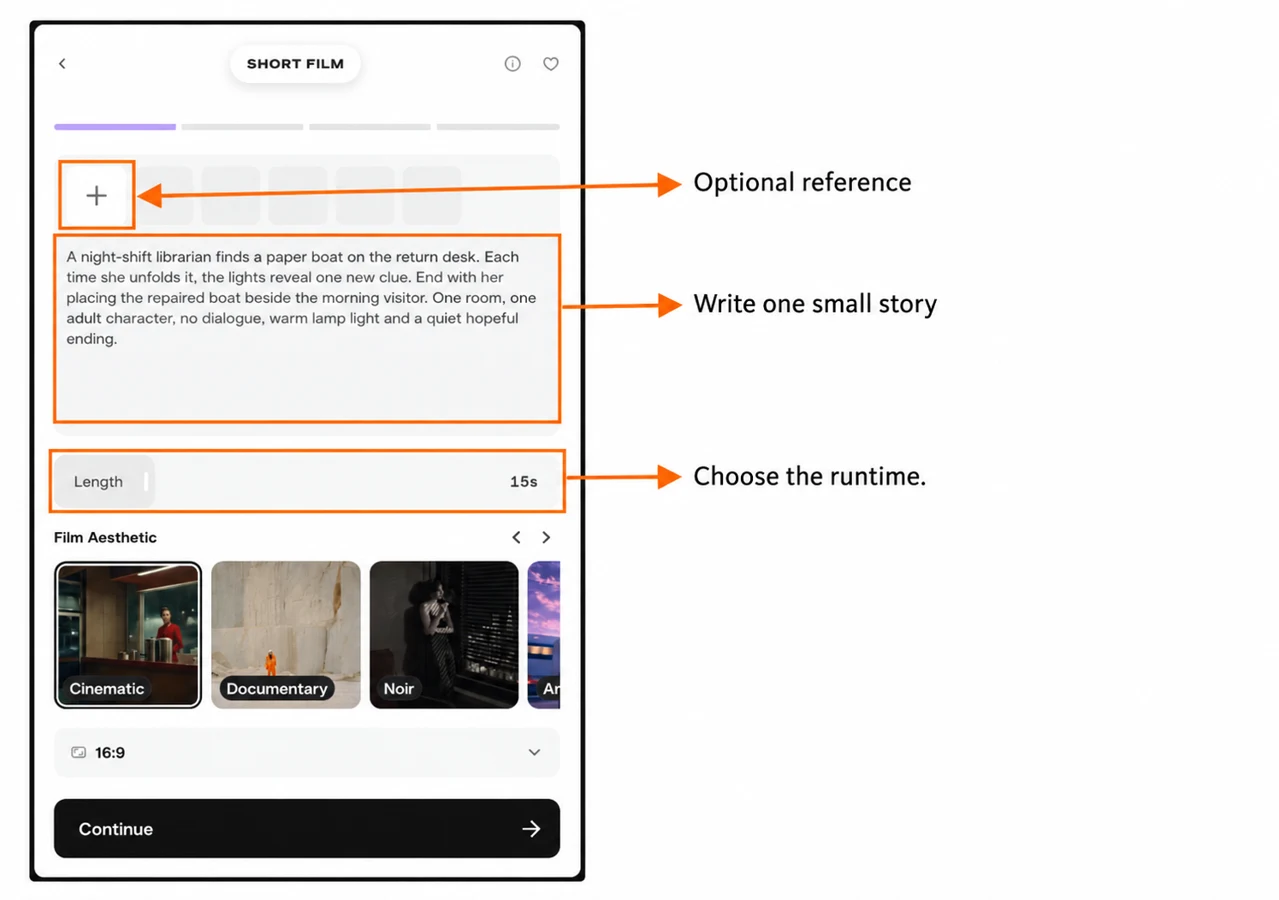
| Setting | Our prepared example |
|---|---|
| Premise | A librarian finds a paper boat at night |
| Runtime | 15 seconds |
| Film Aesthetic | Cinematic |
| Aspect ratio | 16:9 |
| References | None attached |
| Story goal | Find the clue, repair the boat, leave it for the visitor |
The screenshot shows a prepared idea. The large demo on the app’s right side belongs to Pika; it is not a film made from our text.
What is Pika Short Film?
Short Film is Pika’s story-led workflow. Its step bar lists Idea → Script → Cast → Review. The app describes a process that builds a script, storyboards and a film from your premise, style and references.
I would start here for a short fictional scene, a story experiment or a small sequence with a beginning and ending. For a single movement from a photo, I would use image-to-video first. For a discussion between presenters, Podcast Video has controls for that format.
Step 1: describe a story we can follow
Open the app directly, or find Short Film in Create’s app list. In Description, write the main character, place, action and ending. Give the scene a small change that can be seen on screen.
Our paper-boat premise
A night-shift librarian finds a paper boat on the return desk. Each time she unfolds it, the lights reveal one new clue. End with her placing the repaired boat beside the morning visitor. One room, one adult character, no dialogue, warm lamp light and a quiet hopeful ending.
For a first 15-second draft, I would simplify the action further: find the boat → inspect one clue → place the repaired boat down. A morning visitor introduces another person, so keep that person outside the frame if you want one cast member.
Two more ideas you can adapt
| Idea | Copyable premise | Keep it manageable |
|---|---|---|
| The last train | An adult station attendant finds a forgotten red scarf. She places it on a bench as the last train’s lights pass. End on the scarf moving gently in the breeze. No dialogue. | One person, one platform, one object |
| A small repair | An adult potter notices a chipped cup, smooths its rim and places it beside a fresh cup of tea. Quiet daylight studio, close views of the hands, a calm ending. | One location and a clear before-and-after action |
These are writing examples, not tested film results. Avoid asking a short film to explain a large backstory, switch between many rooms or introduce several speakers.
Step 2: choose the runtime
The Length slider offered 8s, 15s, 30s, 1m, 1m 30s and 2m. I checked each position and returned the example to 15s.
| Runtime | How I would plan it |
|---|---|
| 8–15 seconds | One event, a reaction and an ending |
| 30 seconds | A short setup, one complication and a resolution |
| 1–2 minutes | More room for a sequence; plan each beat before requesting it |
A longer setting does not fix a crowded premise. Read the story aloud and decide which parts need a separate shot. The selected runtime is a request; inspect the final downloaded duration after a future render.
Step 3: pick the film treatment
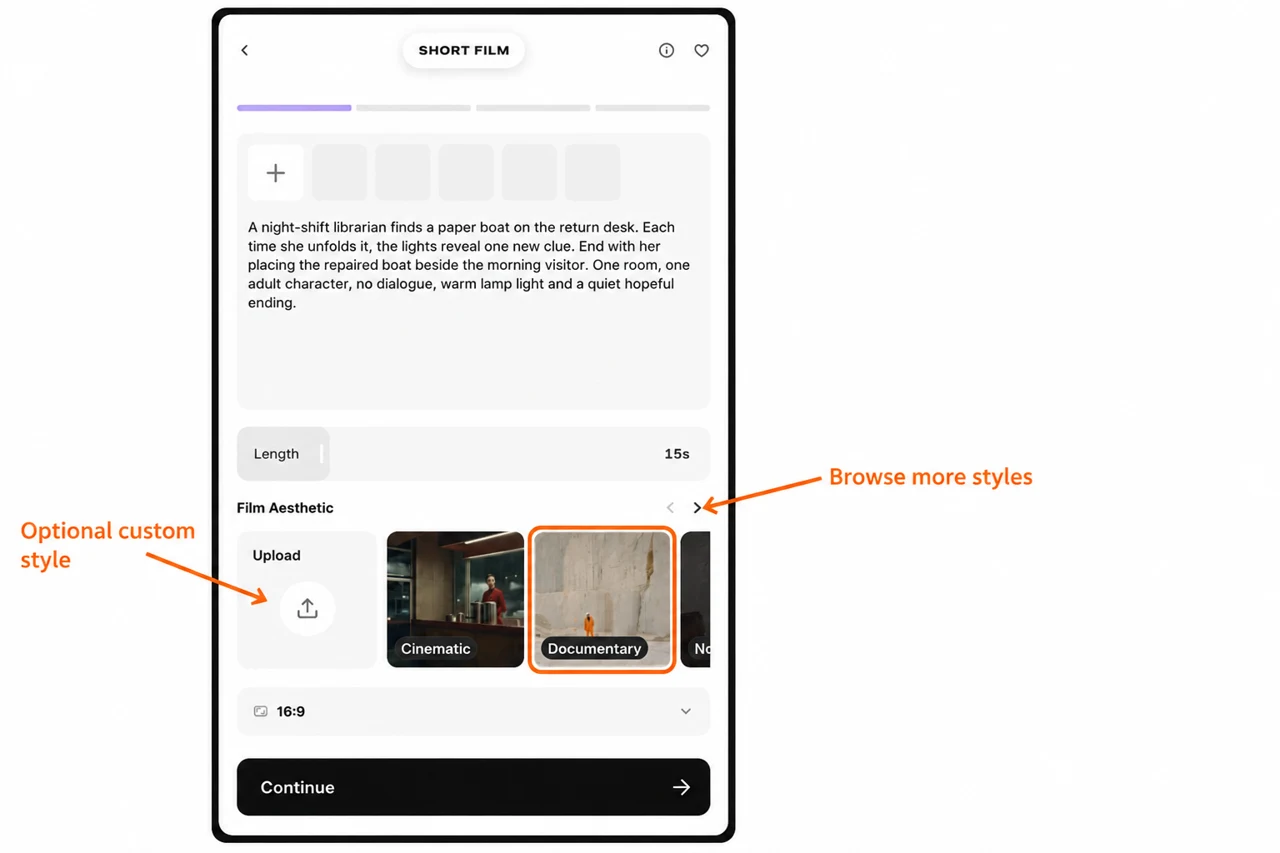
Film Aesthetic offered Cinematic, Documentary, Noir, Anime, Indie, Surreal and Sci-fi, plus Upload for a custom aesthetic image. I selected Documentary to inspect its state, then returned our story to Cinematic.
| Treatment | A useful starting idea |
|---|---|
| Cinematic | A fictional scene with planned light and framing |
| Documentary | A grounded everyday activity |
| Noir | A mystery with a restrained mood |
| Anime | An animated story direction |
| Indie | A small personal scene |
| Surreal | A dream-like event |
| Sci-fi | A speculative setting or object |
These are planning suggestions based on the treatment names. We did not render a style comparison. Choose one direction and describe it consistently in the premise.
Step 4: add references only when they help
The Add tile above the description opens an image picker. It offers Upload and saved collections such as Assets, Characters and Scenes. Select the image, then confirm Use Selection. We inspected the picker and left the example without an attachment.
A room photo can explain the location; a character reference can explain the person. The separate Upload tile under Film Aesthetic is for the treatment. Keep those jobs clear instead of attaching unrelated pictures.
For a first setup, I would use one clear reference at most: the desk or the main character. Describe how it connects to the story so the app has one consistent direction.
Step 5: choose the frame shape
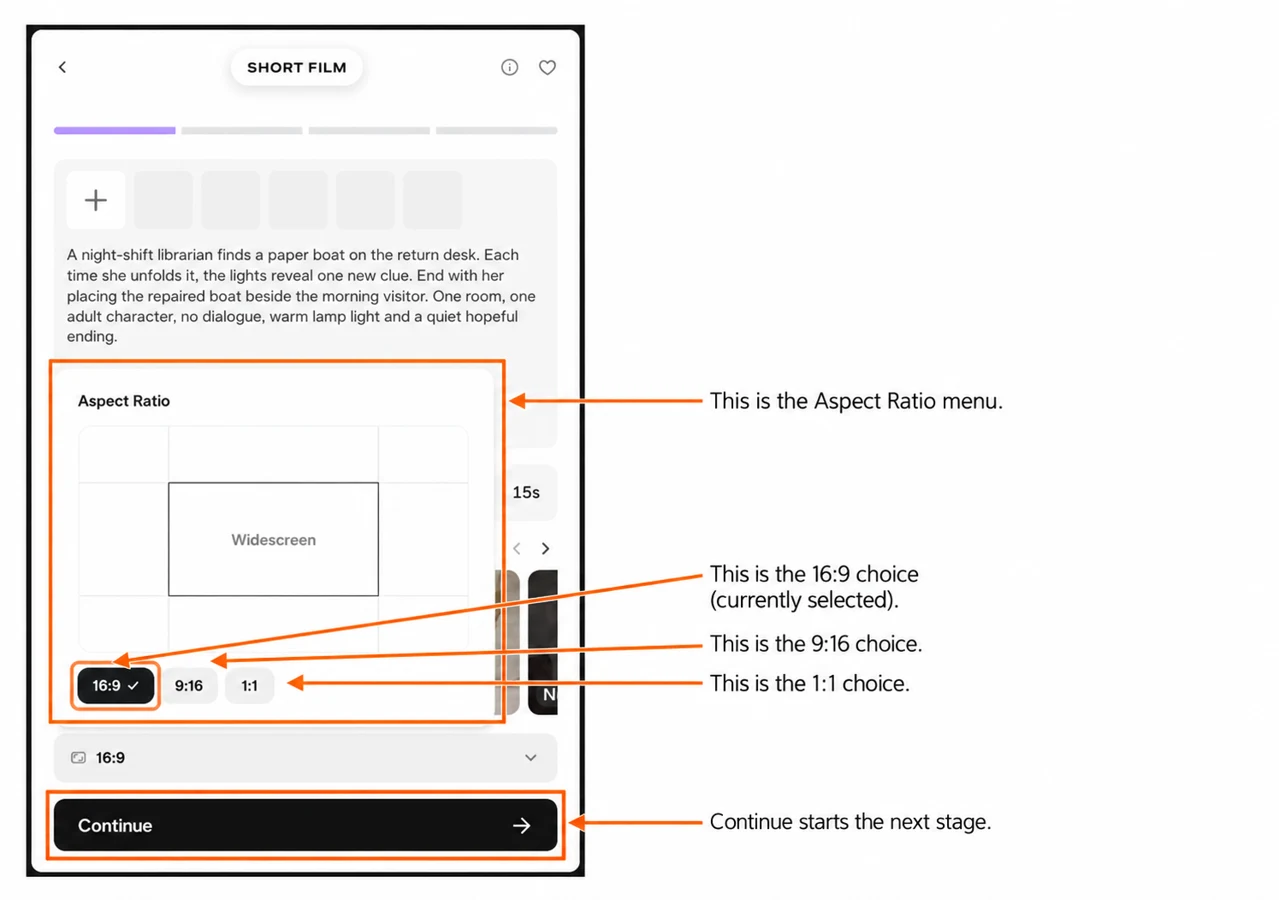
The menu offers 16:9, 9:16 and 1:1. I would choose 16:9 for a landscape film player, 9:16 for a vertical clip or 1:1 for a square placement.
Include important objects inside the chosen frame. A wide desk scene may need a simpler arrangement when you choose a vertical format.
Before you continue to Script, Cast and Review
The next stages were locked on the fresh Idea screen. We did not press Continue, so I am not presenting invented screenshots or controls for those stages.
Use the visible step names as planning checkpoints:
| Stage | What I would check when it opens |
|---|---|
| Script | Does the story preserve the premise and fit the requested time? |
| Cast | Are the people and their roles consistent with the story? |
| Review | Do the plan, references, settings and credit estimate match what you want? |
These are review questions, not a claim about uninspected fields. Read any credit notice before advancing. Do not assume a button named Continue is a free step or that preparing a script includes the cost of the final film.
My small-story checklist
- One main character and one clear place.
- A change the viewer can understand without a long explanation.
- A runtime that fits the number of actions.
- One consistent film treatment.
- References that explain the story rather than compete with it.
- A frame shape chosen for the intended placement.
- The complete credit estimate checked before any paid stage.
I would keep the first idea small, inspect the plan and expand the story only after the sequence makes sense.